Samsung Galaxy S4 Woes and FNB

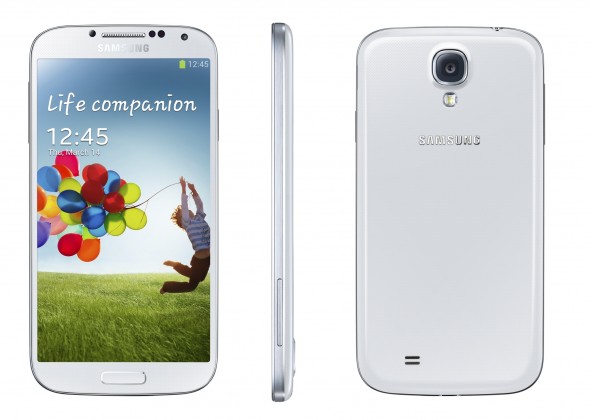
Earlier this year I switched to FNB as my main bank. Transition was fairly uneventful. When the Galaxy S4 was released a month or two later, the bank offered it in tandem with a CellC 100 package at a discounted rate, and I decided to try it out.

The major issue for me in these dealings was the lack of store. FNB mobile services are all handled over the phone/internet and devices are delivered. This is a particular hassle as I had to be there in person to collect the package when it arrived at work. Not easy due to where I work and the type of work I do. Anyway.

Received the phone 3 days after scheduled delivery and two phone calls, due to a variety of issues mainly, in my opinion, a lazy delivery man. In any case, Success!
geek.com

geek.com

Get home, start up, all good. Connect to wifi, start fiddling. Wifi disconnects… try reconnect, can’t see any APs. Minute later phone reconnects, only to disconnect 10s later… Try everything to get it to work properly, no luck, google issue. People mention certain routers have been known to cause this issue, try out suggested tips. No luck. Go to friend’s house, another friend’s house, Cell-C shop. All WiFi APs result in same problem.

Cell-C won’t take the phone as it came from FNB, phone Samsung SA, they tell me I can take it to service shop where I live. Take it to them, they won’t take it cause it’s still within 7 day return period. Phone FNB, they say no problem they’ll come and collect it. Again, it’s a hassle for me trying to organise collection when I’m available. Anyway, few days later, phone gets collected, probably a week or so after I got the phone.

Another issue was that The CellC simcard I got with the phone wasn’t registering on the network. CellC said that I must speak to FNB, FNB people I contacted (apparently not the correct ones) said I should phone CellC customer care, who were equally helpless. In any case I decided to leave this until I got my phone back. A week after I first received my phone I received an email which told me the sim card would automatically register after 2 days.

So another week later I get a phonecall to say my new phone is going to be delivered to me. Cue another hassle of trying to get phone delivered when I’m available. New phone works 100%, sim-card is registered, everything’s going well.

Two months down the line and my battery life seems to be suffering, lasting me from 06h00 – 20h00 with moderate use, used to be go in excess of 24 hours without requiring a charge. One day my phone was on 70% battery, drops to 0%, restarts itself a couple times, stays off. Open case and take out battery, battery looks swollen :x

Think to myself what a schlep this is going to be going through FNB again, taking my phone etc. Will be without a phone that can take a micro-SIM. Anyway, decide to go straight to local Samsung support shop, walk in, they go in to the back come out with a brand new battery, slot it in and I’m good to go again.

Although I haven’t heard of other people with the same Wi-Fi problem as me, many people are starting to complain about the battery swelling. The battery has a 6 month guarantee, so I’m hoping my next battery lasts. No idea if this is a phone or battery issue. Time will tell.

Dropbox and Syncing all your photos to your Galaxy S4

A few months ago I got my hands on a Samsung Galaxy S4. As part of the setup procedure it asks for your login details for Dropbox, this was great, I actively use Dropbox, had the app on my previous phone and regularly access files from my cellphone. As it was set-up on my previous phone to only download files when I request/access them, I expected the same to happen with this setup.

http://www.talkandroid.com

http://www.talkandroid.com

The next day I checked my gallery, and saw hundreds and hundreds of photos that Dropbox had decided I wanted to have on my phone. Fortunately I was on Wi-Fi, otherwise that 1.5Gb could have hurt my phone bill at the end of the month. This wasn’t a major problem, as I assumed I’d missed something in my settings which told it to sync photos, so I went in search of the correct settings. And I couldn’t find them anywhere.

I compared the settings exactly to that on my previous Android phone and there was no difference. After searching for a quite a while on the internet, I eventually came across a forum post that explained my problem. The setting I was looking for wasn’t in Dropbox, it was in my phones ‘Accounts’ options, and not under the Dropbox account, but under the general ‘Cloud’ options.

If you look at the bottom you’ll see a ‘Contents sync (with Dropbox) menu, here you can disable the syncing of pictures, videos and documents. Disabling this option then removed all my photos from my gallery and prevented the further unwanted syncing of files from Dropbox to my phone.

So to get there:

Settings > Accounts tab > Cloud > Contents sync

Master’s Update

So after an amazing three months in Germany, I had to come back to the real world and finish off a Master’s Dissertation.

I got back to PE mid-December and had a week to finish off my testing before I left for the Cape for two weeks. I then had five more days in PE before I had to hand in my dissertation. Final hand-in date to still qualify for April graduation was 11 January, handing in after that date would mean I’d have to reregister for another year of studies, and would probably result in me doing a whole lot more work, not necessarily a bad thing.

But with 3 days to go I was still doing testing. Below you can see a clip I compiled of said testing. In the end I handed in a dissertation in time. Most of it had gone through a round of editing by both my gran and girlfriend, with slight input from my supervisor. I wasn’t completely happy with what I’d handed in, and could have done with another month to neaten up the report, read through it properly and get some proper feedback from my supervisor, but such is life, and what is done is done.

In any case, the following week I did a demonstration for the project initiators who were quite happy with the results and it will most likely be taken forward. There’s a second master’s project on the table which will be extending on my work, but the company in question are going to take the design to contractors with the plan of getting a commercial unit up and running. Exciting stuff, my supervisor was also quite happy and said from his side he doesn’t think there’ll be any problems, so know I just sit and wait for results from the external. If I hear before the end of March I’ll be surprised, but don’t know when I should start bugging my supervisor for answers :)

In the mean time I’ve moved another step further from the Cape to the city of East London where I’ve got an appointment at a large manufacturing plant for the next year. The work ought to be quite interesting as the factory’s busy with a rebuild, but it’ll be interesting to see where it goes.

Once I’ve had feedback on my master’s and have made any necessary changes I’ll put my full thesis up. I also have to write up a journal type article on the project so will post that whenever I get round to finishing it. In the mean time you can see my previous post on the project here.

Research Work

As part of my time spent in Reutlingen I did some reasearch work for Prof. Dr -Ing Gruhler of the Mechatronics Department of the Hochschule Reutlingen. I ended up compiling two reports. The first was a purely research based one and the second included some practical work on a mobile robot. The work on the second report was used in a journal article available here.

Summary of Omni-Directional Drive Choices

This report briefly introduces the concept of an  omni-directional drive. It then proceeds to give overviews of many of the the currently available and in use methods of achieving omni-directional drive. Both units which have received commercial use, and those restricted to hobby robotics have been listed. Because no specific application was in mind, no recommendation towards a specific drive method was made. The appendix includes some further information and links to a design report and video demonstration of most of the drive methods listed in the report.

Drive types mentioned include: Omni-Wheels, Anisotropic Wheels, Omni-Ball, Mecanum Wheel, Swerve Drive, Ball Drive, Vuton Tracks, Omni-Crawler, Hemispherical Gimbaled.

The report can be downloaded here (4.5 MB PDF)

Notes on Robot Odometry

In this report a pre-built omnidirectional robot is  modified to allow for better odometry as well as control. The report investigates several possibilities for odometry, and then making use of available equipment adds a proximity sensor to the robot for accurate tracking. In addition to this the movement control code is replaced with PID controllers for both directions of movement. Slight adjustments are made to the visual interface with the robot and a Wi-Fi connection is re-established.

The full report can be downloaded here (2.1 MB PDF)